Support & Integration
Chapter 7 — Supporting systems, integration requirements, and dependency management for a complete OT/IT segmentation solution
7.1 Supporting Systems Ecosystem
A complete OT/IT network segmentation solution is not limited to the boundary devices themselves. It requires a carefully integrated ecosystem of supporting systems that provide identity management, time synchronization, log aggregation, patch delivery, asset inventory, and threat detection capabilities. Each supporting system has a defined integration point with the Industrial DMZ and must be connected through controlled, audited pathways. The diagram below shows all supporting systems integrated into a single comprehensive view, illustrating the data flows and integration points for each system.
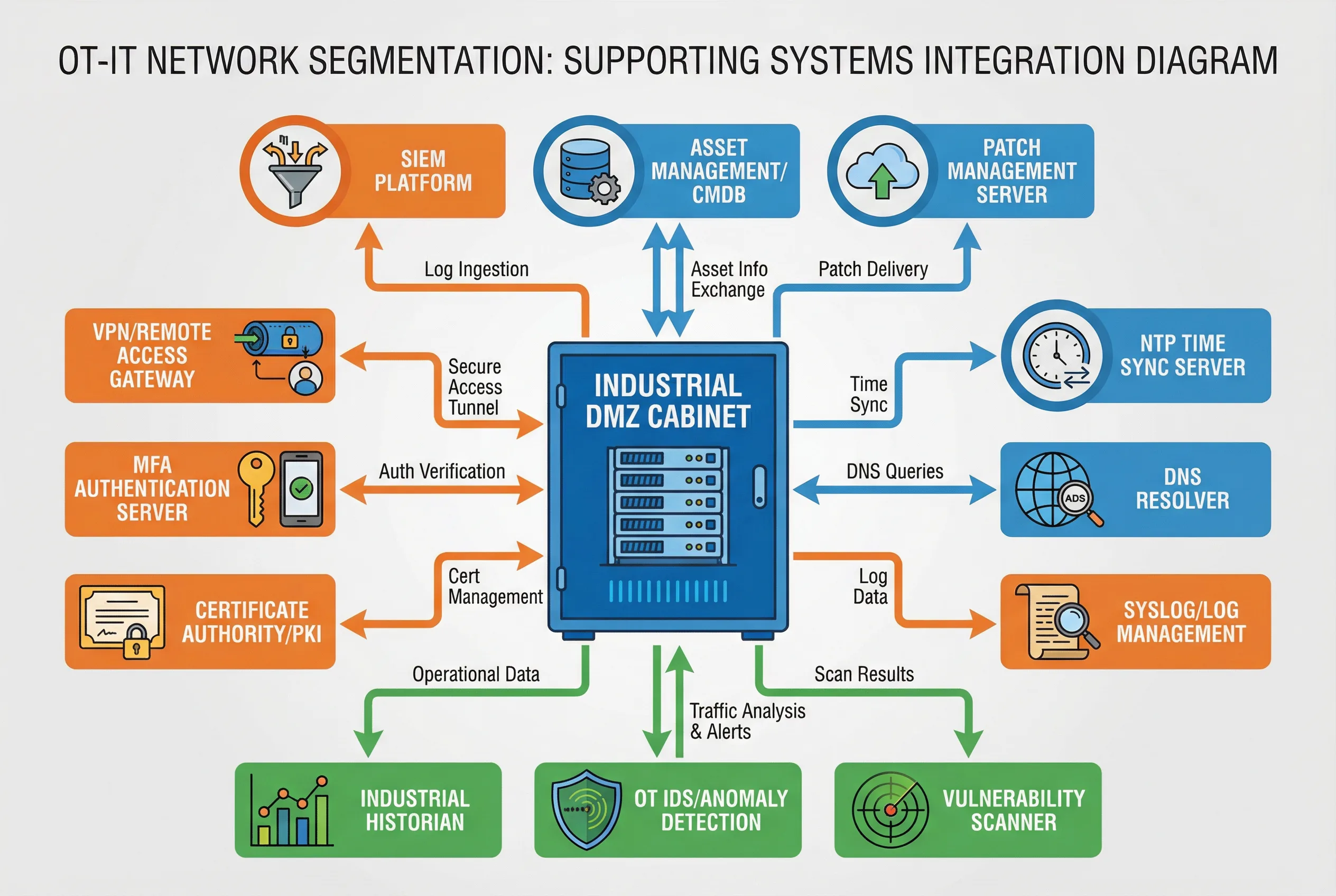
Figure 7.1: Supporting Systems Integration Diagram — All supporting systems connected to the Industrial DMZ cabinet: SIEM Platform, Asset Management/CMDB, Patch Management Server (top/IT services, blue); VPN Gateway, MFA Server, Certificate Authority/PKI (left/security services, orange); NTP Time Sync, DNS Resolver, Syslog/Log Management (right/infrastructure services, blue); Industrial Historian, OT IDS/Anomaly Detection, Vulnerability Scanner (bottom/OT services, green). All data flows labeled.
| Supporting System | Function | Integration Point | Data Flow Direction | Protocol/Interface |
|---|---|---|---|---|
| SIEM Platform | Centralized security event correlation and alerting | Syslog Collector in DMZ | OT → DMZ → SIEM (one-way) | Syslog/CEF over TCP 514 |
| Asset Management / CMDB | OT asset inventory, configuration tracking | OT IDS passive discovery + DMZ API | Bidirectional (read-heavy) | REST API via DMZ |
| Patch Management Server | Controlled delivery of patches to OT systems | File Transfer Gateway in DMZ | IT → DMZ → OT Patch Staging (one-way) | SFTP/HTTPS with AV scan |
| VPN / Remote Access Gateway | Encrypted remote access tunnel for O&M staff | O&M Access Zone VPN Concentrator | Internet → O&M Zone → DMZ Bastion | IPSec/SSL VPN |
| MFA Authentication Server | Multi-factor authentication for all privileged access | O&M Access Zone MFA Server | Bidirectional (auth verification) | RADIUS/LDAP over TLS |
| Certificate Authority / PKI | Certificate issuance for device and user authentication | DMZ PKI relay | Bidirectional (cert management) | SCEP/CMP/HTTPS |
| NTP Time Sync Server | Accurate time synchronization for all OT devices | NTP Relay in DMZ | IT NTP → DMZ Relay → OT devices | NTP/PTP UDP 123 |
| DNS Resolver | Controlled DNS resolution for OT devices | DNS Relay in DMZ | OT → DMZ DNS → IT DNS (whitelist only) | DNS UDP/TCP 53 |
| Syslog / Log Management | Log collection, storage, and retention | Syslog Collector in DMZ | OT → DMZ → Log Management | Syslog TCP/UDP 514 |
| Industrial Historian | Long-term process data storage and analytics | Historian Relay in DMZ | OT Historian → DMZ Relay → IT Historian | OPC UA / REST API |
| OT IDS / Anomaly Detection | Passive OT traffic monitoring and threat detection | Passive TAP on OT segments | OT traffic → IDS (passive, no injection) | Passive mirror/TAP |
| Vulnerability Scanner | Periodic OT asset vulnerability assessment | Controlled scan via DMZ | DMZ → OT (scheduled, read-only) | OT-safe scan protocols |
7.2 Identity and Access Management Integration
Identity and access management (IAM) integration is one of the most complex aspects of OT/IT segmentation. The OT environment typically has its own user accounts and access controls, which may not be synchronized with the IT Active Directory or LDAP. The recommended approach is to integrate OT system authentication with the enterprise IAM through the DMZ, using LDAP over TLS or SAML federation, while ensuring that the OT systems retain local authentication capability as a fallback for emergency access when the DMZ is unavailable.
| Access Type | Authentication Method | Authorization Source | Session Control | Audit Requirement |
|---|---|---|---|---|
| Remote O&M (external vendor) | VPN + MFA (TOTP/hardware token) | PAM role-based access | JIT access, time-limited session | Full session recording (video + keystroke) |
| Remote O&M (internal staff) | VPN + MFA (TOTP) | AD group + PAM role | Session timeout after 30 min inactivity | Session recording, command log |
| Local HMI/EWS access | Local account + smart card or PIN | Local OT user database | Auto-lock after 10 min inactivity | Local audit log forwarded to SIEM |
| Emergency access | Break-glass account (physical safe) | Local account only | Dual-person authorization required | Mandatory post-incident review |
| Service account (system-to-system) | Certificate-based (mTLS) | PKI certificate policy | Automated, no interactive session | Certificate usage log |
7.3 Patch Management Integration
Patch management for OT systems is significantly more complex than for IT systems. OT vendors often require specific patch testing procedures, and patches must be validated against the specific hardware and software configuration of the target system before deployment. The patch management integration must support a staged workflow: patch download to IT patch server, transfer through the file gateway with content scanning, staging in the OT patch staging server, testing in a lab environment, and finally controlled deployment to production systems during scheduled maintenance windows.
| Patch Stage | Location | Activities | Approval Required | Rollback Capability |
|---|---|---|---|---|
| Download & Verification | IT Patch Server | Download from vendor, verify hash/signature | IT Security | N/A |
| Transfer to OT Staging | File Transfer Gateway → OT Patch Staging | AV scan, file type check, size limit, audit log | OT Security | Delete from staging |
| Lab Testing | OT Lab Environment | Install on identical hardware, functional test, regression test | OT Engineering | Restore lab from snapshot |
| Production Deployment | Target OT System | Scheduled maintenance window, pre-deployment backup, install, verify | Plant Manager + OT Security | Restore from pre-deployment backup |
| Post-Deployment Verification | Target OT System | Functional test, process behavior verification, IDS baseline update | OT Engineering | Rollback if verification fails |